As I’ve often said on this blog, doing good work, producing quality results on time, and not keeping teams under constant stress is more a matter of organization than of spending excessive hours in front of a computer. When overtime stops being occasional and becomes chronic, it points to a serious planning and productivity problem. That’s all there is to it.
And yet I constantly see people overusing email to manage tasks through endless reply chains, and using Outlook or Gmail as document repositories. I also often see Excel being used to plan work…
We talk a lot about the knowledge society, and we all have access to computers, laptops, smartphones, and so on, but some things are still done just as they were in the nineties: people rarely move beyond email and the office suite of the day.
At this point, managing a team’s tasks exclusively through email and Excel spreadsheets isn’t just outdated; it reveals a lack of productivity or sheer inertia among people who overuse these tools without looking for more suitable, agile options. I’m sorry if your boss or manager works this way: their disorganization will affect you one way or another.
We need to replace the use (and abuse) of these tools with ones designed to manage projects or tasks, and you also need to define your own workflows. Choosing a task-management tool comes after you’ve figured out how you organize your work (your workflows).
The real question isn’t which tasks to do at a given moment or over the next few days or weeks, but how you manage your time.
Email is not:
- A document repository for version control.
- A place to remind you what you need to do.
- By no means a tool for generating reports that someone will need to retrieve someday.
- A substitute for brainstorming sessions when defining project details.
Similarly, Excel is:
- Not for managing tasks among members of the same team.
- Much less for managing project phases.
- A disaster when several people try to edit the same document at once…
Yes, it seems obvious that we overuse these tools. I’m afraid they’re effectively the standard way most people organize themselves.
Still, that’s better than nothing. The people who are most stressed and anxious at work and in everyday life are often the ones trying to keep everything “in their heads,” the ones who don’t take a moment to prioritize because everything feels urgent, and the ones who don’t trust themselves to stop and ask, How can I manage my time and work a little better?
Your mind is a poor ally when it comes to managing an overload of work, because:
We tend to magnify most tasks in our minds, especially the ones we haven’t thought through yet. How many times have I been going around in circles over something that ended up taking less than an hour to resolve…
The mind doesn’t prioritize well: to prioritize, you need to stop for a while, calmly review all the open issues and commitments you have, and consider them in detail (assuming you haven’t forgotten any).
Likewise, the mind isn’t a calendar; we tend to forget things.
Trying to keep everything in your head is the main source of stress and anxiety, and ultimately of low productivity. So we need to get all our pending tasks out of our heads.
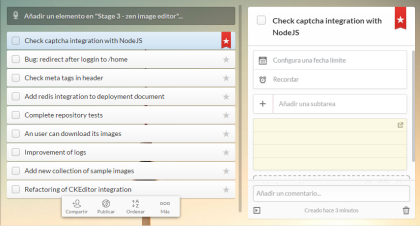
For years, I’ve used tools that let me manage my pending tasks easily, and I use those same tools to plan my work. Best of all, there are several fairly popular options that are free and offer more than enough functionality.
It’s absolutely liberating not to have to rummage through your mind to figure out what to do at any given moment (while worrying that you’ve forgotten something important), and instead to calmly turn to your task manager.
There are many options. I’ve personally been using Wunderlist for a long time (even for things related to my daughters and home).

More recently, I’ve started using Trello, which is more geared toward projects involving several people, and I’ve been pleasantly surprised. As I said, though, there are many other options:
- Asana, also geared toward project management.
- Todoist, more focused on task lists.
- Nirvana for GTD, an implementation of the Getting Things Done method by David Allen.
- Evernote.
- Taco.
What do we gain by taking a moment to organize our tasks (or those of the team we manage) in one of these tools? First, we get the sense that our work is “under control” and that nothing is slipping through the cracks—at least nothing important.
I always say it’s bad not to know what you’ll be working on over the next few weeks. Good work isn’t improvised; it’s planned.
What’s more, seeing all your projects, their current status, and their outstanding tasks displayed visually helps you accommodate changes or unexpected issues.
It’s satisfying to click on one of your pending tasks to mark it complete; it’s like taking a step forward. Work done!
Having tasks clearly identified and defined as specifically as possible also helps you make use of the free moments that come up at home or on weekends. If you have to stop and think about what to do, you’ll probably end up doing whatever you feel like most at that moment—not what’s most important or highest priority. We can rarely make progress on any kind of project by indulging every whim that strikes us.
So, using the typical spreadsheet and overusing email to manage your work is better than using nothing. Much better is using a web tool or a set of tools to manage, plan, and organize your work and other people’s work. But better still—above all of the above—is working with your own well-defined workflow.
Ultimately, when you have a task list, those tasks have come from a particular way of working. You need to define that workflow yourself and try to adapt it to each type of project or circumstance. In other words, how you use any task manager follows from having well-defined workflows.
Having your own set of workflows means you don’t have to stop and figure out how to handle every new job or task that comes your way: you simply apply your usual workflow. Here are a few examples from my day-to-day work:
- If a task comes up that you can finish in less than two or three minutes, do it immediately. It may seem trivial, but this helps clear out both your mental to-do list and the one in whatever tool you use.
- Whenever you identify a new task, include its due date when you write it down. This isn’t trivial: we know tasks without a deadline either get done at the very end or never get done at all…
- Review the status of your tasks at least twice a day: at the start and end of your workday. This lets you reprioritize tasks as circumstances require, and you finish the day with a clear idea of what you’ll do tomorrow (giving your subconscious a chance to work on it in the background…).
- Tasks should be specific enough that you can start and finish them without jumping to other things in between. Nothing hurts productivity more than trying to do several things at once. If a task may take many hours, break it into smaller, more specific tasks.
These are just a few examples, but the important thing is that having a clear snapshot of what we’re dealing with frees us from the overwhelming feeling that there’s never enough time to do everything. We can prioritize at each moment and distinguish what’s important from what’s urgent. In fact, you may never end up with “urgent” issues because they were important earlier and were handled at the right time.